ecmwf_models



Readers and converters for ECMWF reanalysis (ERA5 and ERA5-Land) data. Written in Python.
Works great in combination with pytesmo.
Installation
This package has been tested on Linux, Windows and macOS for
python 3.10, 3.11, and 3.12.
Ideally you should use one of the supported python versions (the package might
still work for older python versions).
Use pip to install all required python dependencies
as well as the ecmwf_models package from pypi.
pip install ecmwf_models
On Windows systems, it might be necessary to install required C-libraries via conda. For installation we recommend Miniconda:
conda install -c conda-forge pygrib netcdf4 pyresample pykdtree
Quick Start
Download image data from CDS (set up API first) using the era5 download and era5land download
console command (see era5 download --help for all options) …
era5land download /tmp/era5/img -s 2024-04-01 -e 2024-04-05 -v swvl1,swvl2 --h_steps 0,12
… and convert them to time series (ideally for a longer period). Check era5 reshuffle --help
era5land reshuffle /tmp/era5/img /tmp/era5/ts -s 2024-04-01 -e 2024-04-05 --land_points True
Finally, in python, read the time series data for a location as a pandas DataFrame.
>> from ecmwf_models.interface import ERATs
>> ds = ERATs('/tmp/era5/ts')
>> ds.read(18, 48)  # (lon, lat)

                        swvl1     swvl2
2024-04-01 00:00:00  0.318054  0.329590
2024-04-01 12:00:00  0.310715  0.325958
2024-04-02 00:00:00  0.360229  0.323502
        ...             ...       ...
2024-04-04 12:00:00  0.343353  0.348755
2024-04-05 00:00:00  0.350266  0.346558
2024-04-05 12:00:00  0.343994  0.344498
More programs are available to keep an exisiting image and time series record
up-to-date. Type era5 --help and era5land --help to see all available
programs.
CDS API Setup
In order to download data from CDS, this package uses the CDS API (https://pypi.org/project/cdsapi/). You can either pass your credentials directly on the command line (which might be unsafe) or set up a .cdsapirc file in your home directory (recommended). Please see the description at https://cds.climate.copernicus.eu/how-to-api.
Supported Products
At the moment this package supports
ERA5
ERA5-Land
reanalysis data in grib and netcdf format (download, reading, time series creation) with a default spatial sampling of 0.25 degrees (ERA5), and 0.1 degrees (ERA5-Land). It should be easy to extend the package to support other ECMWF reanalysis products. This will be done as need arises.
Docker image
We provide a docker image for this package. This contains all pre-installed dependencies and can simply be pulled via
$ docker pull ghcr.io/tuw-geo/ecmwf_models:latest
Alternatively, to build the image locally using the provided Dockerfile, call from the package root
$ docker buildx build -t ecmwf_models:latest . 2>&1 | tee docker_build.log
Afterwards, you can execute the era5 and era5land commands directly in
the container (after mounting some volumes to write data to).
The easiest way to set the API credentials in this case is via the
CDSAPI_KEY container variable or the --cds_token option as below.
$ docker run -v /data/era5/img:/container/path ecmwf_models:latest bash -c \
   'era5land update_img /container/path --cds_token xxxx-xxx-xxx-xx-xxxx'
You can use this together with a task scheduler to regularly pull new data.
Citation

If you use the software in a publication then please cite it using the Zenodo DOI. Be aware that this badge links to the latest package version.
Contribute
We are happy if you want to contribute. Please raise an issue explaining what is missing or if you find a bug. Please take a look at the developers guide.
Downloading ERA5 and ERA5-Land data
ERA5 (and ERA5-Land) data can be downloaded manually from the Copernicus Data Store (CDS) or automatically via the CDS api,
as done in the download modules (era5 download and era5land download).
Before you can use this, you have to set up an account at the CDS and get your
API key.
Then you can use the programs era5 download and era5land download to
download ERA5 images between a passed start and end date.
Passing --help will show additional information on using the commands.
For example, the following command in your terminal would download ERA5 images
for all available layers of soil moisture in netcdf format, between
January 1st and February 1st 2000 in netcdf format into /path/to/storage.
The data will be stored in subfolders of the format YYYY/jjj. The temporal
resolution of the images is 6 hours by default, but can be changed using the
--h_steps option.
era5 download /path/to/storage -s 2000-01-01 -e 2000-02-01 \
    --variables swvl1,swvl2,swvl3,swvl4 --h_steps 0,6,18,24
The names of the variables to download can be its long names, the short names (as in the example). See the ERA5 variable table and ERA5-Land variable table to look up the right name for the CDS API.
By default, the command expects that you have set up your .cdsapirc file
to identify with the data store as described above. Alternatively you can pass
your token directly with the download command using the --cds_token option.
Or you can set an environment variable CDSAPI_KEY that contains your token.
We recommend downloading data in netcdf format, however, using the --as_grib
option, you can also download data in grib format.
For all other available options, type era5 download --help,
or era5land download --help respectively
Updating an existing record
After some time, new ERA data will become available. You can then use the
program era5 update_img with a path to the existing record, to download
new images with the same settings that became available since the last time
the record was downloaded. You might even set up a cron job to check for new
data in regular intervals to keep your copy up-to-date.
Reading data
To read the downloaded image data in python we recommend standard libraries such as xarray or netCDF4.
However, you can also use the internal classes from this package. The main purpose of these, however, is to use them in the time series conversion module.
For example, you can read the image for some variables at a specific date. In this case for a stack of downloaded image files (the chosen date must be available of course):
>> from ecmwf_models.era5.reader import ERA5NcDs
>> root_path = "/path/to/netcdf_storage"
>> ds = ERA5NcDs(root_path, parameter=['swvl1'])
>> img = ds.read(datetime(2010, 1, 1, 0))

# To read the coordinates
>> img.lat   # also: img.lon
array([[ 90. ,  90. ,  90. , ...,  90. ,  90. ,  90. ],
       [ 89.9,  89.9,  89.9, ...,  89.9,  89.9,  89.9],
       [ 89.8,  89.8,  89.8, ...,  89.8,  89.8,  89.8],
       ...,
       [-89.8, -89.8, -89.8, ..., -89.8, -89.8, -89.8],
       [-89.9, -89.9, -89.9, ..., -89.9, -89.9, -89.9],
       [-90. , -90. , -90. , ..., -90. , -90. , -90. ]])

# To read the data variables
>> img.data['swvl1']
array([[   nan,    nan,    nan, ...,    nan,    nan,    nan],
       [   nan,    nan,    nan, ...,    nan,    nan,    nan],
       [   nan,    nan,    nan, ...,    nan,    nan,    nan],
       ...,
       [0.159 , 0.1589, 0.1588, ..., 0.1595, 0.1594, 0.1592],
       [0.1582, 0.1582, 0.1581, ..., 0.1588, 0.1587, 0.1584],
       [0.206 , 0.206 , 0.206 , ..., 0.206 , 0.206 , 0.206 ]])
The equivalent class to read grib files is called in ERA5GrbDs.
Conversion to time series format
For a lot of applications it is favorable to convert the image based format into a format which is optimized for fast time series retrieval. This is what we often need for e.g. validation studies. This can be done by stacking the images into a netCDF file and choosing the correct chunk sizes or a lot of other methods. We have chosen to do it in the following way:
Store the time series as netCDF4 Climate and Forecast convention (CF) Orthogonal multidimensional array representation
Store the time series in 5x5 degree cells. This means there will be up to 2566 cell files and a file called
grid.ncwhich contains the information about which grid point is stored in which file. This allows us to read a whole 5x5 degree area into memory and iterate over the time series quickly.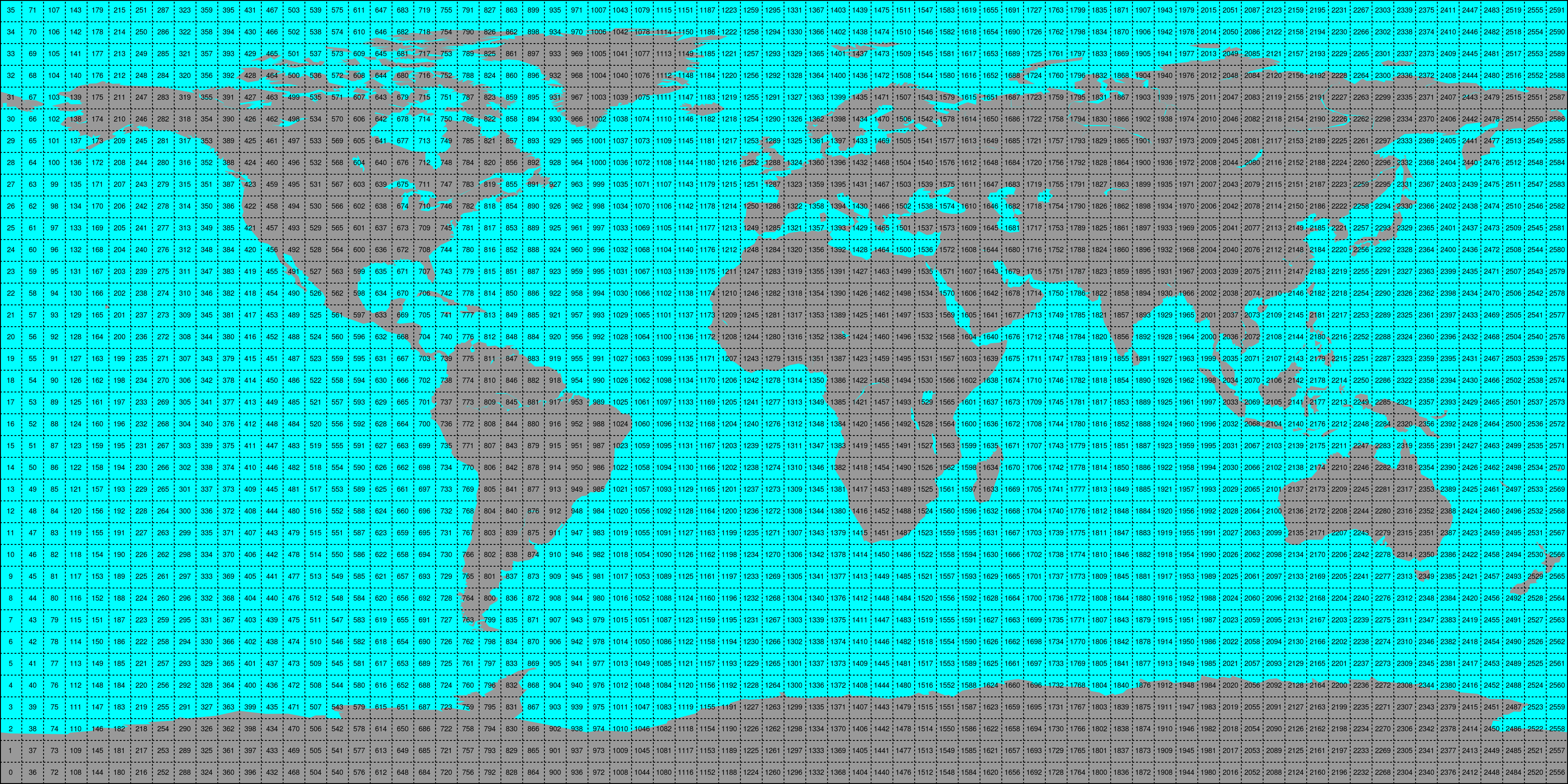

This conversion can be performed using the era5 reshuffle (respectively
era5land reshuffle) command line program. An example would be:
era5 reshuffle /path/to/img /out/ts/path 2000-01-01 2000-12-31 \
     -v swvl1,swvl2 --h_steps 0,12 --bbox -10 30 30 60 --land_points
Which would take (previously downloaded) ERA5 images (at time stamps 0:00 and 12:00 UTC)
stored in /path/to/img from January 1st 2000 to December 31st 2000 and store the
data within land points of the selected bounding box of variables “swvl1” and
“swvl2” as time series in the folder /out/ts/path.
The passed variable names (-v) have to correspond with the names in the
downloaded file, i.e. use the variable short names here.
For all other option see the output up era5 reshuffle --help and
era5land reshuffle --help
Conversion to time series is performed by the repurpose package in the background.
Append new image data to existing time series
Similar to the update_img program, we also provide programs to
simplify updating an existing time series record with newly downloaded
images via the era5 update_ts and era5land update_ts programs.
This will use the settings file created during the initial time series
conversion (with reshuffle) and look for new image data in the same path
that is not yet available in the given time series record.
This option is ideally used together with the update_img program in, e.g.
a cron job, to first download new images, and then append them to their time
series counterpart.
era5 update_ts /existing/ts/record
Alternatively, you can also use the reshuffle command, with a target path
that already contains time series. This will also append new data (but make sure
you use the same settings as before).
Reading converted time series data
For reading time series data, that the era5 reshuffle and era5land reshuffle
command produces, the class ERATs can be used. This will return a time series
of values for the chosen location.
Optional arguments that are forwarded to the parent class
(OrthoMultiTs, as defined in pynetcf.time_series)
can be passed as well:
>> from ecmwf_models import ERATs
# read_bulk reads full files into memory
# read_ts takes either lon, lat coordinates to perform a nearest neighbour search
# or a grid point index (from the grid.nc file) and returns a pandas.DataFrame.
>> ds = ERATs(ts_path, ioclass_kws={'read_bulk': True})

>> ds.read(18, 48)  # (lon, lat)

                        swvl1     swvl2
2024-04-01 00:00:00  0.318054  0.329590
2024-04-01 12:00:00  0.310715  0.325958
2024-04-02 00:00:00  0.360229  0.323502
        ...             ...       ...
2024-04-04 12:00:00  0.343353  0.348755
2024-04-05 00:00:00  0.350266  0.346558
2024-04-05 12:00:00  0.343994  0.344498
Bulk reading speeds up reading multiple points from a cell file by storing the
file in memory for subsequent calls. Either Longitude and Latitude can be passed
to perform a nearest neighbour search on the data grid (grid.nc in the time series
path) or the grid point index (GPI) can be passed directly.
Contents
- Downloading ERA5 and ERA5-Land data
- Updating an existing record
- Image Reading
- Conversion to time series format
- Append new image data to existing time series
- Time Series Reading
- All variables available for ERA5
- All variables available for ERA5-Land
- License
- Authors
- Changelog
- Unreleased changes in master branch
- Version 0.11.2
- Version 0.11.1
- Version 0.11.0
- Version 0.10.4
- Version 0.10.3
- Version 0.10.2
- Version 0.10.1
- Version 0.10.0
- Version 0.9.2
- Version 0.9.1
- Version 0.9
- Version 0.8
- Version 0.7
- Version 0.6.1
- Version 0.6
- Version 0.5
- Version 0.4
- Version 0.3
- Version 0.2
- Version 0.1
- Module Reference